TL;DR
- An e-signature audit trail records who did what, when, and from where, so the signature can be defended later by someone who was not in the room.
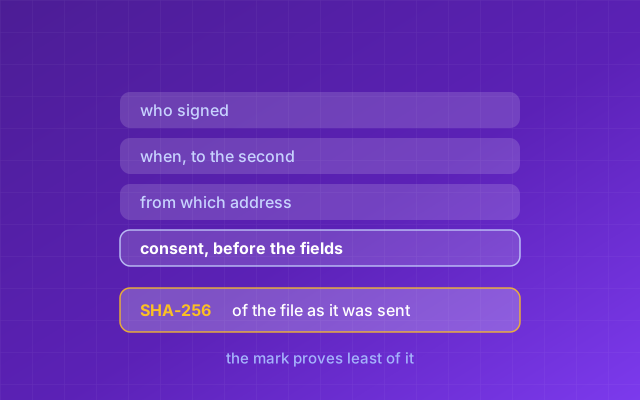
- The signature image proves almost nothing on its own. The evidence lives in the consent record, the timestamps, the per-recipient access, the event log and the document hash.
- A SHA-256 hash of the document is the only element that proves the file itself has not changed since it was sent for signature.
- To use that hash, hash the original document you were sent and compare it to the "Original SHA-256" printed on the certificate inside the signed copy. Hashing the signed copy will not match, because the certificate is added to the file after the original is hashed.
- Consent has to be captured before the signer can fill in anything, because consent recorded after the act is a record of the act, not of the consent.
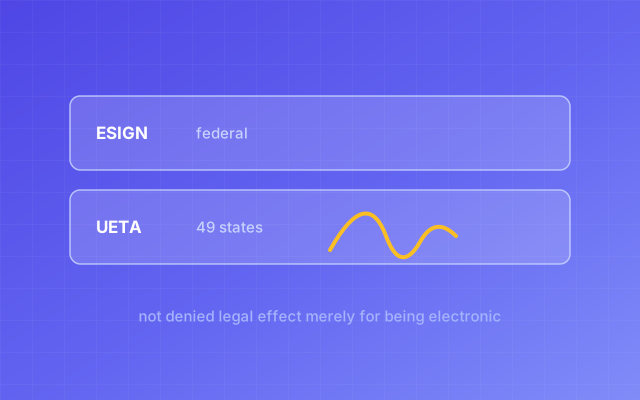
- Under ESIGN (15 U.S.C. ch. 96) and UETA a signature cannot be denied legal effect for being electronic, but the burden of proving who signed still sits with you.
- New York is the only state that has not adopted UETA; Illinois adopted it in 2021, so any vendor page still calling Illinois a holdout is out of date.
An e-signature audit trail is the set of records a signing system keeps about a signing event: who each recipient was, when each of them consented, viewed, filled and signed, the network address and browser each act came from, and a fingerprint of the document itself. It exists for one reason: if the agreement is ever questioned, the trail is what you produce.
Most people evaluating signing tools start by comparing the signing experience. That is the wrong end. The experience is broadly similar wherever you look: a link, some fields, a typed or drawn name. The audit trail is not, and you find out how far it varies on the day it matters. Neither is what happens after the signature, which is what RunwayDue against DocuSign compares.
An audit trail is evidence, and evidence has an audience
An audit trail is not for you, it is for the person who doubts you, and that is the test to apply to every element in it. You already know your client signed the statement of work, because you watched the notification arrive. The trail exists for the moment somebody else needs convincing: a finance director who says the scope was never approved, a lawyer preparing a claim, an acquirer's diligence team.
An audit trail is not for you. It is for the person who doubts you.
RunwayDue
None of that is answered by a picture of a signature, which can be typed by anyone or pasted from an email footer. What answers it is the surrounding record: this named person opened a link sent only to them, consented at a recorded time, and signed a document whose fingerprint matches the file you hold.
What an audit trail has to contain, and what each element proves
A defensible trail contains eight elements, each proving something different. Missing one does not invalidate the signature, but it does leave a specific question you cannot answer.
| Element | What it proves | What it does not prove |
|---|---|---|
| Signer name and email | Who the document was addressed to, and where the invitation went | That the person there is who they claim to be |
| Consent, with its own timestamp | The signer was told what electronic signing means, and agreed before acting | That they read it |
| Timestamp of each act, to the second | The sequence: that signing came after consent and after viewing | The signer's location or intent |
| IP address at signing | The network the act came from, which can corroborate or contradict a denial | Physical location, or identity |
| User agent | The device family used, useful when two signatures are claimed to come from one person | Identity, and it is spoofable |
| Per-recipient access token | That the signature came from the link sent to that recipient | That the intended human, not someone with their inbox, used it |
| Full event log, append-only | The whole sequence: views, reminders, declines, downloads | That the log was never edited, unless edits are impossible |
| SHA-256 hash of the document | That the file has not changed by a byte since it was recorded | Who signed it |
The right-hand column is the one to read twice: an IP address, for one, cannot place a person in a building, because a VPN or a shared office puts many people behind one address. The last row deserves the hardest look. Every element above it is a claim the vendor makes about its own database. The hash is the only one you can verify yourself.
A log tells you what happened; a tamper-evident record shows nothing has changed since
There is a real difference between a log and a record, and the two words get used interchangeably. A log is a list of events in a database, and it is only as trustworthy as the database. If rows can be updated or deleted by an admin panel or a support engineer, the log describes events rather than proving them. Useful, but not tamper-evident.
A tamper-evident record is one where an alteration would be detectable from outside the system. Two design decisions produce that: an append-only event log, where no code path updates or deletes an event once written, and a fingerprint of the document taken before anything is stamped onto it.
So ask a vendor directly whether support staff can edit or delete an entry in your audit trail. An answer that is a paragraph rather than a no tells you which you are buying. RunwayDue's signature event table is append-only by design, and each event carries its timestamp, the actor, the network address and, where relevant, a detail line.
A document hash is what makes the file itself checkable
A hash is what turns "this is the contract" into a statement anyone can test.
SHA-256 is a hash function standardized by NIST in FIPS 180-4. Feed it a file of any size and it returns a 256-bit value, written as 64 hexadecimal characters. Anyone can recompute it, and changing one bit of the input produces a completely different output. No SHA-256 collision has been published, and its predecessor SHA-1 was broken publicly in February 2017, when CWI Amsterdam and Google produced two different PDFs with the same digest.
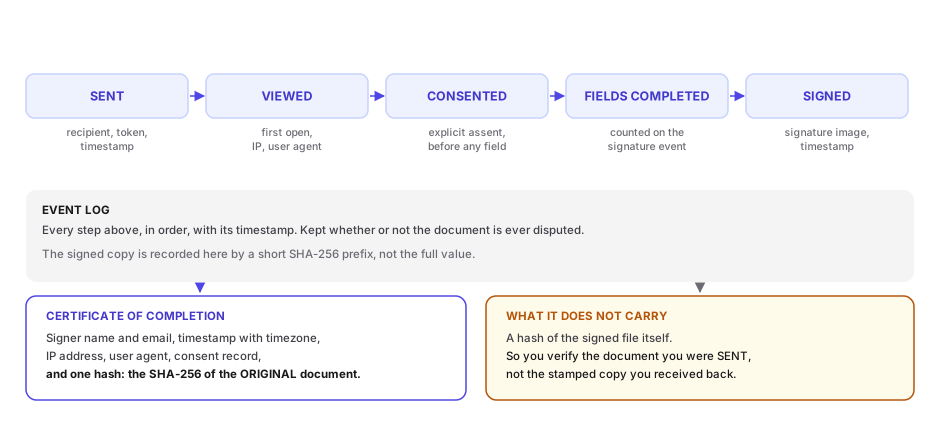
RunwayDue hashes the source PDF on upload and prints the value on the certificate of completion, labeled "Original SHA-256". When the last recipient has signed, the certificate pages are appended to the document, and only then is the finished file hashed. That second hash is stored against the signed copy and noted on the completion event, where the log line carries its first 16 characters.
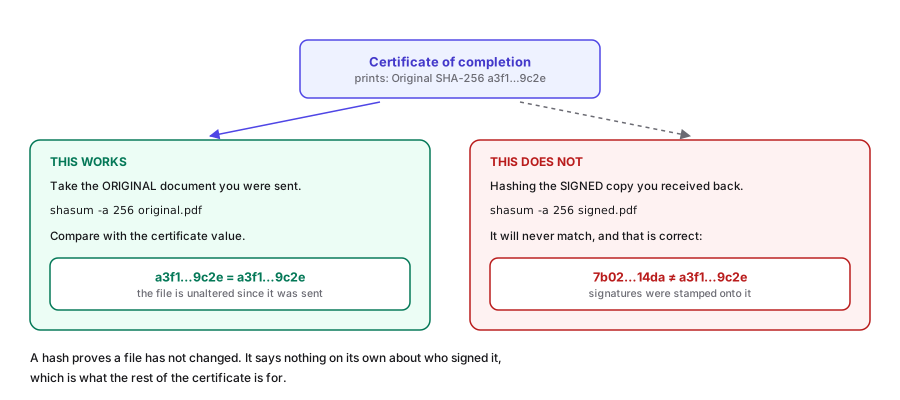
That order decides how you check the document, and it is the part most explanations get backwards. A file cannot contain its own hash, because adding the hash changes the file, so the check that works is on the original.
Years later, anyone holding the original document can run one command and compare the result against the "Original SHA-256" printed on the certificate inside the signed copy: shasum -a 256 agreement.pdf on macOS or Linux, or Get-FileHash agreement.pdf -Algorithm SHA256 on Windows PowerShell.
If the value matches, the document recorded at the start of the signing is byte for byte the document in front of you. If it does not, the file you hold is not the file that was signed against. So keep the original, not only the signed copy: it is the half of the pair that makes the printed hash mean anything.
That check needs no account and no internet connection, and it works even if the vendor no longer exists. The signed copy's own hash is a different exercise, because the full value is held on the file record rather than printed on the page.
Consent has to be captured before the first field, not after the last
Consent recorded after signing is a record of the signature, not of the consent.
This is the most common sequencing error, and it is easy to spot. If a tool puts the consent checkbox on the final confirmation screen, next to the Finish button, consent was collected after the signer had already typed their name. The trail then says they agreed to sign electronically at 14:32:07 and filled the signature field at 14:31:44, which a careful reader will notice.
The correct order is: show the consent notice, capture agreement with its own timestamp, then unlock the fields. RunwayDue enforces this on the server, not only in the interface: the signing action refuses any field value from a recipient with no recorded consent timestamp, so the order cannot be reversed by a client that skips the screen.
The notice should say three things in plain language: what will be recorded about you, that the other parties will see it, and that you can ask for a paper copy or decline. A notice saying only "I agree to sign electronically" is weaker, because the signer can later claim they did not know their IP address and browser were logged.
ESIGN section 7001(c)'s consumer consent requirements apply where a statute or regulation requires information to be given to a consumer in writing, which most business-to-business agreements do not trigger. Capturing consent properly is still the right default.
Per-recipient access is the difference between naming a person and naming a document
A signing link shared by everyone can only prove that somebody signed. A link issued per recipient can prove which recipient signed.
If two people are named on a contract and both get the same URL, the system cannot tell them apart beyond what they typed into a name box. Give each their own link and every view, consent and field fill attaches to a named person with an email address on file.
Two details matter in how those links are made. First, the token must be unguessable. Database identifiers such as cuids are built to avoid collisions, not to be secrets: they encode a timestamp, a machine fingerprint and a counter, so seeing one narrows the search space for the rest. A signing link is often the only lock on the document, so RunwayDue takes each token from 32 bytes of the operating system's cryptographically secure randomness, rendered as 43 URL-safe characters.
Second, the token must be checked at the boundary, not only on the screen: a check that runs when the page renders, but not when the document API runs, is walked past by anything that does not render the page.
A certificate of completion is the audit trail in a form you can hand to a stranger
A certificate of completion is the audit trail rendered as pages appended to the signed PDF, so the evidence travels with the document rather than living behind a login. Bound into the file, evidence and agreement are one thing you can email to a lawyer. That is what RunwayDue's e-signature binds into every finished file.
A certificate that does its job shows all of the following:
- The document title, the original filename, and a unique reference for the request.
- The SHA-256 hash of the original document.
- Who sent it, when it was created, and when it was completed.
- Whether signing was sequential or parallel, since order can matter to what each party saw.
- For each recipient: name, email, role, whether they signed, the consent and signature timestamps, the network address and the user agent.
- The full event log as a table, with a timestamp and a network address on every row.
- A plain-language note on what kind of signature this is and what it is not, written against the law of the market you sell into.
- A footer on every page giving the reference and "page N of M", so a missing page is visible.
A missing value should print as "not recorded" rather than dropping the line, because a reader cannot tell "we did not capture this" from "this certificate has no such field".
RunwayDue's certificate prints the title and filename, the request reference, the Original SHA-256, the sender, the creation and completion times, the signing order, the per-recipient block, the event log and a per-page footer, and it prints "not recorded" rather than dropping the line wherever a network address is missing.
Item 7 is the one to check on a sample rather than take on a claim. The legal note printed on the certificate follows the country of the workspace that sent the document: a US sender's names the ESIGN Act and state electronic transactions law, an Indian sender's the Information Technology Act, 2000. Read it on a sample signed PDF and judge it for your own use. The rest of the certificate is jurisdiction-neutral: names, times, addresses, events and a hash do not change when the governing law does.
ESIGN and UETA set the legal floor, and the floor is low
In the United States an electronic signature cannot be denied legal effect solely because it is electronic. That is the rule, and it is nearly all of the rule. The statutes behind that sentence, and the four things that turn a mark into an enforceable signature, are in is an electronic signature legally binding in the US.
The federal statute is the Electronic Signatures in Global and National Commerce Act, ESIGN, at 15 U.S.C. ch. 96, beginning at section 7001. The state counterpart is the Uniform Electronic Transactions Act, UETA. New York is the only state that has not adopted it, relying on its own Electronic Signatures and Records Act. Illinois adopted UETA in 2021, replacing its 1998 statute, so any comparison page still listing Illinois as a holdout is stale.
What neither statute does is tell you your signature is proven. They remove one objection, that the signature is electronic. Every other question stays where it was: who signed, whether they intended to, and whether this is the document they signed.
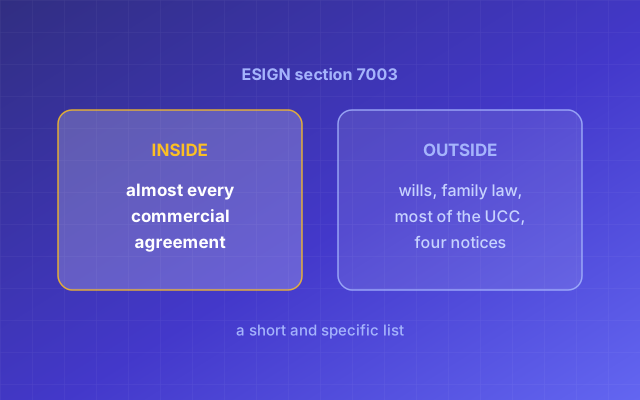
ESIGN section 7003 also excludes categories of document: wills, codicils and testamentary trusts, family law matters such as adoption and divorce, and most articles of the Uniform Commercial Code, though Articles 2 and 2A, covering sales and leases of goods, are expressly left in, along with UCC sections 1-107 and 1-206. If you sell or lease goods, ESIGN still applies. Section 7003(b) withholds ESIGN from five kinds of notice rather than requiring paper for them: court documents, utility cancellation, foreclosure or eviction on a primary residence, cancellation of health or life insurance benefits, and product recalls that concern health or safety. It also excludes the paperwork that has to travel with hazardous materials.
The statutes answer "is an electronic signature valid at all". Only your audit trail answers "who signed this" and "is this the document they signed".
Five questions that separate a real audit trail from a screenshot
Ask these five in a demo.
- Do you hash the document, and with what algorithm? You want SHA-256 or better, with the hash of the original printed on the certificate.
- When do you capture consent, relative to the first field being filled? You want: before, enforced on the server. If consent and signature share a timestamp on a real certificate, consent was collected at the end.
- Is each recipient's link unique, and how is the token generated? You want per-recipient links from a cryptographic random source. Ask how long the token is.
- Can anyone at your company edit or delete an audit trail entry? You want a plain no, backed by an append-only design.
- Does the audit trail travel with the PDF, or live in your app? You want it appended to the signed document. Read the last pages of a sample, legal note included.
If you have to log into a vendor's app to see your audit trail, ask what happens to your evidence the day you stop paying.
RunwayDue
What RunwayDue records, and what it does not
On a PDF signature request, RunwayDue records consent before any field can be filled, the signer's name and email, the timestamp of every act in UTC, the IP address, the user agent, per-recipient tokens, a full append-only event log, and a SHA-256 hash of the original document, printed on the certificate; a contract signed on its share link keeps only the typed name, an optional title and email, the time and the network address, with no consent step and no certificate. The documents it usually records this for are contracts, and the list of what cannot be signed at all is in what cannot be signed electronically.
The mechanics, because this is where general descriptions usually stop. Consent is a timestamp of its own on the recipient record, and the server rejects field values from a recipient without one. The event log covers created, sent, reminded, viewed, consented, signed, declined, completed, voided and downloaded, and nothing updates or deletes an entry once written. Field values are not their own event; they are recorded as a count on the signature event. At completion the finished file is hashed and stored with its own SHA-256, whose first 16 characters appear on the completion event.
The limits are worth saying out loud. This is an e-signature with an audit trail, not a certificate-based digital signature backed by a certificate authority, and it does not verify a signer's government identity. The legal note printed on the certificate is written for the country of the workspace that sent the document, whether that is the United States or India, so read it on a sample before relying on its wording. Documents must be unprotected PDFs, since a password-protected file cannot be stamped without corrupting it. And a link sent to an email address proves the link was used, not that a particular human held the mouse. RunwayDue does not try to close that gap, and no email link can; products that do add identity checks such as a government ID scan or a live selfie match, which is a different product from this one.
Signing does not stand alone either: an accepted proposal becomes a contract with dated billing, each instalment opens a pre-filled invoice when you choose to bill it, and the audit trail is the evidence layer under all of it.
Frequently asked questions
What is an e-signature audit trail?
The record a signing system keeps of who did what, when, and from where during a signing event. At minimum it names each recipient, timestamps their consent, view and signature, records the network address and browser they acted from, logs every event in sequence, and fingerprints the document with a hash.
Why does a SHA-256 hash matter?
Because it is the only part of the record you can verify yourself, without trusting the vendor. SHA-256 reduces a file of any size to 64 hexadecimal characters, and changing one bit changes the result completely.
How do I check the hash of a document against its certificate?
Hash the original document you were sent, not the signed copy: shasum -a 256 agreement.pdf on macOS or Linux, Get-FileHash agreement.pdf -Algorithm SHA256 on Windows PowerShell. Compare the result to the "Original SHA-256" printed on the certificate of completion. The certificate is added to the signed copy after the original is hashed, so the signed copy's own hash is recorded separately rather than printed inside itself.
Why can I not just hash the signed PDF?
Because a file cannot contain its own hash. Appending the certificate pages changes the bytes, so any value printed inside the signed copy is necessarily the hash of something else, here the original.
When should consent to sign electronically be captured?
Before the signer can fill in anything, and it should carry its own timestamp. Consent captured on the final confirmation screen produces a trail where the consent timestamp is later than the field timestamps, which is a weak record. Whether US law requires that consent in the first place is answered in the post on whether an electronic signature is legally binding.
Does ESIGN or UETA make my electronic signature automatically enforceable?
No. ESIGN, at 15 U.S.C. ch. 96, and UETA prevent a signature from being denied legal effect solely because it is electronic. They do not prove who signed, when, or what they signed. Those remain questions of evidence, which is what the audit trail is for. Where UETA applies, and the one state that relies on its own statute instead, is covered in is an electronic signature legally binding in the US.
Does ESIGN cover contracts for the sale of goods?
Yes. ESIGN section 7003(a)(3) excludes most of the Uniform Commercial Code, but expressly leaves in Articles 2 and 2A, covering sales and leases of goods, along with UCC sections 1-107 and 1-206. The rest of what ESIGN leaves out is set out in what cannot be signed electronically in the US.
What does RunwayDue's audit trail not do?
It does not produce a certificate-based digital signature backed by a certificate authority, and it does not verify a signer's government identity. It records that a private link sent to one email address was used, with consent, at a recorded time, on a document whose hash is printed on the certificate.