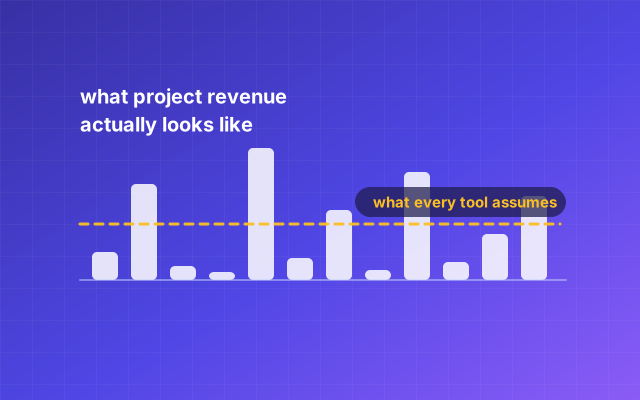
- Lumpy revenue is income that arrives in bursts tied to project events rather than in equal amounts on the same day each month.
- Most invoicing software is compared on features that assume a monthly cycle, which is why comparisons rarely mention deposits, milestones or what happens when a project pauses.
- An invoicing tool tells you who owes you money; a bookkeeping tool tells you whether you made any. Buying the first while believing you bought the second is the expensive mistake.
- The question that reveals most about a billing tool is not what it does while you pay, it is what it does to your records when you stop.
- A deposit and a milestone are rows in a billing schedule, and a tool that cannot store one makes you retype the same numbers every quarter.
- If your pitch, your agreement and your invoice live in three tools, the handoffs between them are where the money leaks.
The category you are shopping for is project billing, not invoicing
If your income arrives in bursts, the category you need is project billing, and almost nothing here is sold under that name. You search for invoicing software and get a grid of tools compared on templates, payment buttons and mobile apps, every comparison assuming the thing you do not have: a stable monthly cycle where roughly the same amount goes out on roughly the same date.
Project billing differs in a specific way. The billable event is not the calendar, it is something that happened in the work. A proposal got accepted. A deposit came due at signature. Phase two shipped. A retainer renewed. Dates are irregular, amounts vary, and much of what you bill this year is already decided but has not happened yet. Next quarter's revenue is whatever sits in your signed agreements, and if your tools cannot show you that, you are running the business on memory.
Lumpy revenue is revenue that arrives in bursts tied to project events rather than in equal amounts on the same day each month.
RunwayDue
Month-based tools break in four specific places when you bill in bursts
Tools built for monthly billing do not fail loudly. They fail in four quiet places, each costing you an afternoon. All four are things invoicing here was built around rather than retrofitted for.
Recurring means monthly, and only monthly. A quarterly retainer becomes three manual invoices, and a weekly sprint arrangement has no home. Check for weekly, quarterly and yearly cycles, and for "every two months" rather than only the named ones.
Pausing is not a state. Project work stops: a client goes quiet, a retainer is suspended, phase two is deferred. Monthly tools model that as active or deleted. You want a schedule you can pause and resume without losing rows.
The dashboard measures the wrong month. "Revenue this month" means little alone: a month with one large milestone looks like a boom and the two either side look like a collapse. What belongs at the top is money owed to you now plus money already committed later.
Nothing understands "agreed but not yet billed." A signed contract worth $48,000 over twelve months is the most important financial fact about your year, and in most invoicing tools it does not exist until you type the invoice.
An invoicing tool and a bookkeeping tool answer different questions
An invoicing tool answers "who owes me money", a bookkeeping tool answers "did I make any", and confusing the two is the expensive mistake in this category. The two comparisons that turn on exactly this are RunwayDue against QuickBooks and against Xero.
Invoicing covers money coming in: raise the document, send it, record the payment, chase the ones that go quiet. It is a receivables tool, and genuinely all some people need in year one. Bookkeeping covers both directions and produces statements: expenses and supplier bills on the money-out side, then a profit and loss, a cash flow statement, a balance sheet and a tax summary. You cannot produce a real profit and loss from invoices alone, because half of one is costs.
The test is simple. If you can only say what you invoiced last year, you have an invoicing tool. If you can say what you earned after costs, you have books. Know which you have before your accountant asks for the other: rebuilding a year of costs in April is a different job from recording them as they happened. If you have been using QuickBooks Self-Employed, which Intuit stopped selling to new customers by March 2024, our QuickBooks Self-Employed comparison covers what it did, what Intuit sells in its place, and which half of the job each one does.
Deposits and milestones are a scheduling problem, not an invoicing problem
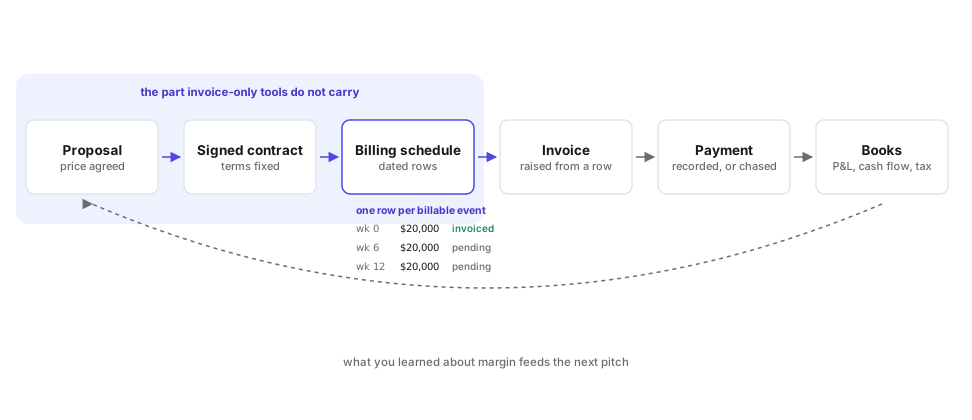
A deposit is not a special kind of invoice, it is the first row of a billing schedule, and tools that treat it as a one-off make you rebuild the arithmetic every time. Which is why they live on a contract here, with a schedule attached, rather than on the invoice.
Here is what goes wrong. You agree $60,000 for a build: 30% at signature, 40% at design sign-off, 30% at launch. In an invoice-only tool you raise an $18,000 invoice today and the other $42,000 exists nowhere, so three months later you have to remember it and work out what is left. Multiply by nine live projects.
What you want is one object holding all three rows with their dates, amounts and statuses, so each becomes an invoice when its moment arrives and the total matches what the client agreed. That last part is not automatic. Splitting $100,000 into twelve installments does not divide evenly, and rounding every row the same way either overbills or leaves the contract short of the signed price. The correct behavior is that each installment bills the same figure and the final one carries the remainder. Test that in a trial and add the rows yourself.
In RunwayDue this is a contract with one of four billing types: one time, monthly retainer, quarterly or milestones. Retainers and quarterly contracts generate their rows from the start date, term and per-period amount. Milestone contracts do not, because milestones are events in your project and there is nothing to infer, so you type them in. Every row carries a label, a due date, an amount and a status of pending, invoiced, paid or cancelled, which turns future committed revenue into a number you can add up.
Recurring and one-off are not a choice, you need both at once
Almost every project business bills both ways at once, so a tool good at only one is a tool you will supplement with a spreadsheet. The mechanisms are genuinely different. In RunwayDue the rhythmic half is recurring billing.
A recurring invoice is a template with a clock. It raises the same invoice again until you stop it, and suits a maintenance retainer, a hosting line, a license renewal. Check which frequencies exist, whether an interval multiplier covers cases like every six weeks, and whether it stops after a set number of runs.
A contract schedule is a list of specific future events with their own dates and amounts. It suits a project with phases, a deposit, or a retainer with an end date. Check whether rows can differ in amount, whether you can edit one without regenerating the rest, and whether raising an invoice from a row flips that row to invoiced.
You want both, because the retainer client who also commissions two projects a year is the normal case. RunwayDue does recurring invoices at weekly, monthly, quarterly and yearly frequencies, with an interval multiplier and an optional end date or run ceiling, so a schedule you might forget can be set to stop, plus contract schedules alongside them. Recurring invoices are on Pro and up; on Free you raise each invoice yourself.
The three tool categories, compared on what project work actually needs
There are three shapes of tool here, and picking the shape matters more than picking the brand inside it. Two invoicing-first tools worth putting in the third column are FreshBooks and Zoho Invoice. The rest are on the comparisons page, sorted by what you are replacing.
| Invoice-only | Books-first | All-in-one for services | |
|---|---|---|---|
| Built around | Sending a document, getting paid | The ledger and the statements | The sequence from pitch to payment |
| Deposits and milestones | Manual invoice each time | Manual, or a projects add-on | Usually a first-class schedule |
| Future committed revenue | Not modeled | Not modeled without a projects module | Modeled, if agreements live in the tool |
| Profit and loss, balance sheet | No | Yes, usually best in class | Yes, narrower than a dedicated package |
| Proposals and e-signature | Rare, often a paid add-on | Rare | Often included, quality varies |
| Typical failure mode | You outgrow it at tax time | Painful quoting and chasing | Weaker in one corner than a specialist |
| Best when | You bill a handful of simple invoices a month | Your accountant drives the choice | Quoting, signing and billing handoffs eat your week |
Read that table as a statement about where your time goes, not which product is better. If you send four invoices a month and your costs are two subscriptions, an invoice-only tool is the right answer. If you carry inventory, run payroll or have a bookkeeper making journal entries, a books-first package is; RunwayDue has no payroll, no inventory and no bank feeds. The all-in-one case wins when the same numbers are retyped between a proposal, an agreement and an invoice, because that retyping is both the time cost and the source of errors clients see. Tools sold for that column differ in which handoff they remove: HoneyBook removes the one between a client saying yes and paying, and its comparison says so first.
Five questions that separate a tool you can leave from a tool you are stuck in
Ask these five before you put a year of records into anything. They matter more than the feature list, which only describes the good case.
- Can I export everything, myself, without asking anyone? Not a report. Everything: clients, invoices, payments, proposals, contracts and their schedules, expenses, bills and the activity log. Ask which formats: JSON means a machine can read it back, CSV means a human can open it, and you want both.
- What happens to documents I already sent when I stop paying? Get this in writing. A plan that stops you starting new work is a different thing from one that locks or deletes what exists.
- Is a future billing event a real object? Can the tool hold "40% due at design sign-off, date to be confirmed" as a row with a status, or does that exist only once you raise an invoice?
- Does it chase for me, and can I control the tone? Check whether reminders are scheduled relative to the due date, whether there is a cap, and whether you can rewrite the wording.
- Who else can see it, and what does that cost? Your accountant needs read access at tax time. If that costs a full seat, add it to the price you are comparing. RunwayDue includes one read-only accountant login on every plan, Free included, not counted as a seat, though exporting from it needs Pro; extra people on Pro and Business are $6 a month each. Per-person pricing makes this the first question to ask; the Bonsai comparison works it through for one, two and three people.
What happens when you stop paying is the most revealing question you can ask
Vendors describe the upgrade path in detail and the downgrade path in a support article, which tells you which one they would rather you thought about. Behavior falls into four tiers. Wave is the clearest test case for this, because its free tier is the product rather than a trial.
| Tier | What the vendor does | What it means for you |
|---|---|---|
| Deletes | Records removed after a retention window | Your history has an expiry date you must diary |
| Locks | Account goes read-only, or unreadable until you pay | Records exist but you cannot use them |
| Freezes new work | Existing documents stay usable, new ones capped | A quiet quarter costs you nothing |
| Freezes and hands you the data | As above, plus a full export | You are a customer by choice, not by capture |
This matters more when revenue is lumpy, because a quiet quarter is normal for you and abnormal for the vendor's pricing model. A tool that reads two slow months as churn punishes your revenue pattern. What that looks like for one real vendor, from its own help centre, is in the Dubsado comparison.
RunwayDue's position is written into the pricing code, not only the marketing: nothing you create is deleted for not paying. Dropping to Free keeps every invoice, proposal and contract where it was, and you can still open, send and take payment on what was already sent. A plan mostly limits what you can start: bills and expenses already recorded stay readable but cannot be edited, reports and automatic reminders stop, and recurring invoices stop raising themselves until you move back up. Self-service export sits on the paid plans, though the data is available on request on any plan, including Free.
One tool from pitch to books beats a stitched stack when the handoffs are the work
Stitch tools together when each does something genuinely specialized. Use one when the value is in the handoffs. For most project businesses, the handoffs are the work. The pitch end is proposals and the books end is reports. If the proposal is the part that needs a specialist, the PandaDoc comparison says when to stitch.
Count the retyping in your current process. A price is agreed in a proposal, restated in an agreement, split into installments in a spreadsheet, typed into an invoice, then categorized in a bookkeeping tool. Five places hold one number, and every one is a chance for a client to receive two documents that disagree.
A single loop removes those chances by construction. In RunwayDue an accepted proposal becomes a contract with a dated billing schedule at the press of a button, each instalment opens a pre-filled invoice when you press Bill it, unpaid invoices are chased on a schedule once reminders are switched on, on Pro and above, and every invoice and bill lands in the books behind the profit and loss, cash flow, balance sheet and tax summary.
The signature step deserves a note, because it is where stitched stacks add a subscription. Electronic signatures are recognized in the United States under the federal ESIGN Act, 15 U.S.C. ch. 96, beginning at section 7001, and at state level under the Uniform Electronic Transactions Act, adopted by every state except New York, which instead has its own Electronic Signatures and Records Act (New York State Technology Law, sections 301 to 309); federal ESIGN applies there for transactions in or affecting interstate commerce. (Illinois adopted UETA in 2021, so any article listing Illinois as a holdout is out of date.) ESIGN section 7003 excludes several categories: wills, codicils and testamentary trusts, family law matters, court documents, and most of the Uniform Commercial Code, though sales and leases of goods, Articles 2 and 2A, stay in scope.
What makes a signature defensible is not the picture of the name, it is the record behind it, so ask what that record holds. On a PDF signature request, RunwayDue captures consent before any field can be filled, the signer's email, UTC timestamps, IP address and user agent, per-recipient tokens, a full event log and a SHA-256 hash of the original document; a contract signed on its share link gets no consent screen and no certificate.
That hash is worth understanding rather than nodding at, because it is easy to be sold a check you cannot run. The completion certificate prints one value, labeled "Original SHA-256": the hash of the document as it was sent, before any signature was stamped on it. So the check that works is to hash the original file yourself and compare it to the certificate. A match tells you the document that went into the signing flow is the one you hold. Hashing the finished, stamped PDF and expecting a match will never work, because stamping changes the bytes. The event log separately notes that a signed copy was generated, with a shortened reference to that copy's hash rather than the full value.
Test the trial against your worst month, not your simplest invoice
A trial tells you almost nothing if you spend it sending one clean invoice, so use the first hour to rebuild your most awkward real deal instead. What to measure in that month is the subject of forecasting revenue that arrives in bursts.
Rebuild a real project with a deposit and two milestones, then check the schedule adds up to the agreed price to the cent. Set up a quarterly retainer with an end date and count the rows it produces. Record a partial payment and check you see a balance, not only paid or unpaid. Enter three costs, including an unpaid supplier bill, then run a profit and loss. Turn on reminders and read the wording that would go to your best client. Send an agreement to yourself, sign it, and hash the original against the certificate. Then export the workspace and open the files.
That last step is the one people skip and the one that matters. An export you have opened is proof; an export described on a pricing page is a promise.
For a benchmark on reminders, on Pro and up: RunwayDue's default chase schedule is three days before the due date, on the due date, then 7, 14 and 30 days late, capped at six chases per invoice, weekends skipped, and you can rewrite all of it. Automatic chasing is not on the Free plan, so testing on Free tests the invoice, not the follow-up.
Frequently asked questions
Four questions that come up here have fuller answers in their own posts: what lumpy revenue means, whether RunwayDue works out your sales tax, whether an electronic signature is legally binding in the US, and how to check a signed document was not altered.
Do I need bookkeeping software, or is an invoicing tool enough?
You need bookkeeping if you want to know whether you made money; invoicing is enough if you only need to know who owes you. Bookkeeping covers both directions and produces a profit and loss, cash flow statement, balance sheet and tax summary. If your costs are small and your accountant is happy with a spreadsheet, invoicing alone can carry you until costs get complicated.
How should I handle a deposit before the work starts?
Bill it as the first row of the project's billing schedule rather than a standalone invoice, so the balance stays attached to the same agreement. The deposit, the milestones and the final payment are then one object that sums to the agreed price, and you never work out from scratch what is left. Recognize it as revenue when your accounting method says to, not automatically on receipt.
Is recurring billing the same as a retainer?
No. A recurring invoice is a template that raises itself on a clock until you stop it. A retainer is a commercial arrangement with a term, a notice period and a total value, better modeled as a dated schedule with an end. Tools offering only the first work until you need to know what the retainer is worth over its remaining term.
What happens to my invoices if I cancel or downgrade?
That depends on the vendor, which is why you ask before you commit. The four behaviors are deletion after a retention window, a read-only or locked account, a freeze on new documents while existing ones stay usable, and that freeze plus a full export. In RunwayDue, dropping to Free keeps everything you made and leaves you able to send and take payment on what was already sent.
What does RunwayDue cost, and is there a free plan?
Pro is $15 per month billed yearly, or $17 billed monthly. There is a Free plan for up to 3 clients with 5 invoices and 3 proposals or contracts a month, and the 14-day trial drops to Free rather than locking you out. Every plan, limit and signing pack is on the pricing page.